This forum is archived information and is no longer active.

Form check Publishing issue from YouTube

Started by Leigh Kettle, March 29, 2018 · 14 Replies · 130 Views

Leigh Kettle

Hey guys 

I’m having a problem related to posting content from YouTube - I wouldn’t normally bother anyone on here but YouTube seemingly have no person I can contact  to be able to help me 

ive obviously published many videos that I’ve posted here with no problem 

now all of a sudden two days ago when I press the little camcorder logo on YouTube (which takes me to my iPhone camera roll to start the publishing procedure), it is only showing 4 of my videos from my entire iPhone camera library

has anyone had this happen to them or can anyone help me with what is happening 

incidentally im not sure whether it’s related but my last 3 videos I’ve uploaded from my camera roll and published here it shows “untitled” even though I entered a title for my video

I’ve tried shutting phone off, signing in again etc all to no avail 

it is so frustrating as I have form checks I need posting lol 

Any help greatly appreciated 

Leigh Kettle

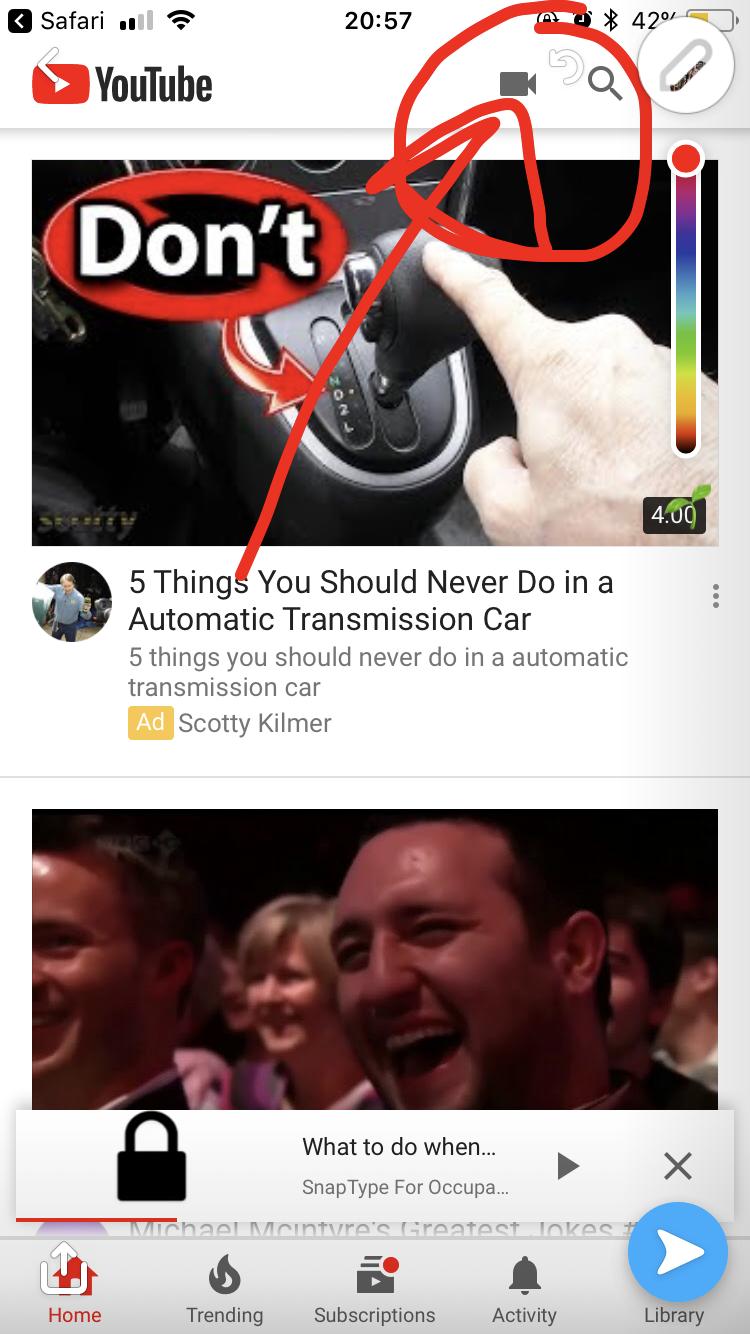
These are the two pages I’m referring to 

when I press the button circled(pic2)  It takes me to the other pic (pic 1)and as you can see it’s now only showing one video to choose from  when my iPhone is  full of videos 

4E4E8DE6-565C-4705-A8FD-D404BBD859DB.png

1B11E76E-1D83-4DEC-A0B1-57416826B12E.png

Affan Osman

Did you select option 'optimize videos' on iPhone to save space? If you did that Apple stores videos on iCloud and will only download when you are playing it. Hence YouTube won't see it. I am assuming that's whats happening as I had the same issue. 

Leigh Kettle

Thanks affan

really appreciate your help 

this may well be the answer ...I’m gonna check now 

many thanks 

Leigh Kettle

Mmmmm this hasn’t worked 

the plot thickens 

so frustrating as cannot post my Form checks 

Kirsten Stewart

Can you do it the opposite way and go in to your camera roll and upload each video?

Leigh Kettle
7 minutes ago, Kirsten Stewart said:

Can you do it the opposite way and go in to your camera roll and upload each video?

How do you mean Kirsten ? 

Leigh Kettle

Oh I think I see what you mean 

yes there is a option to do that going to try that now

don't understand what has changed tho as I never use to have any issues. 

I wonder if it’s coincided with settings on my phone that now mean  gymnastic bodies always asking me for sign in to the forum now even when I’m already  logged in on the course library or whether that’s something gb has altered  their end . Technology and me don’t go that well to know how these things work 

when I used to log in my password and email address were already in the boxes but now they aren’t . Even tho I tick remember be - aaaaaagh technology is soooooo frustrating sometimes 

Kirsten Stewart

I have a 6s and it lets me click on the video from my camera roll then when I click the little share icon (like a square with an arrow in it) YouTube is one of the choices and as long as I'm logged in it publishes it. Does that make sense? Hope I'm understanding your issue I'm no computer expert lol.

Kirsten Stewart

Just saw ur other message. Trust me I hear you!

Leigh Kettle

Thanks Kirsten yes I see how I can do it that way so thanks for that 

I think Affan may be on to something 

i tried to turn off “optimise storage” but it said It couldn’t save all videos as not enough storage - that old chestnut 

so I kept it on 

I then force downloaded a random video on my camera roll and hey presto it appeared on YouTube publishing option . Not straight away after around ten mins. 

I then went into another random video on my camera roll  and pressed “edit” as if I was doing to edit the video  - it then said “downloading video” and again this then appeared on my YouTube list .

its a slow somewhat tedious process but at least it looks like I may be able to get videos uploaded now. 

just  Dont  understand what's changed as ive always had iPhone set to optimise storAge - but it definitely seems to be something to do with videos not actually being downloaded from I cloud or something  

Affan Osman

Leigh, even though you had optimize storage selected you didn’t see an issue earlier was because you still had enough space on your iPhone. Now that you are running out of space Apple is deleting videos from your phone and storing in iCloud. You will have to free up space on your phone or buy a new iPhone :)

Shouldn’t take 10 mins to download video if you are on WiFi.

Leigh Kettle

This phone isn’t that old really tho Affan That’s the annoying thing. 

When I got my new phone it was suddenly full of old videos and stuff from I cloud and it’s filled it again. There really must be another way of doing this photo keeping thing 

So is there a way to delete from phone yet keep in I cloud . And if that’s the case how do you view on I cloud without it being on phone . God only knows what I have on I cloud if it even exists . 

Apologies we going off the subject a little and certainly off f1 


Joshua Hibbert

It was a recent update which meant that videos and photos were automatically been stored on icloud and not on your iphone storage.  Good in some ways as it frees up a lot of space but makes accessing them from your phone very annoying.  It is actually quite simple to access them from a desktop/laptop.  The website is www.icloud.com and the log in details are your apple ID.  

Leigh Kettle

Thanks johsua

yes bit annoying when you trying to show people pics and you not in range 

oh well modern technology eh 

thanks again mate 

Leigh