This forum is archived information and is no longer active.

How to use the New Workout Scheduler

Started by Somalie, November 11, 2015 · 12 Replies · 525 Views

Somalie

Hi guys its been a while sense I have frequented the forums and was hoping to grab some help concerning the New Workout Scheduler.


After initial configuration of 3 Day Foundation template, I had proceeded with the workouts as set forth. Week 5 for most all PE1 elements and one Element at Week 1. After completing a week I advanced the week on the scheduler and it was the same workouts same elements same way as the previous week. Is this correct or am I missing something. Please help!

Cory Fair
Somalie said:

Hi guys its been a while sense I have frequented the forums and was hoping to grab some help concerning the New Workout Scheduler.


After initial configuration of 3 Day Foundation template, I had proceeded with the workouts as set forth. Week 5 for most all PE1 elements and one Element at Week 1. After completing a week I advanced the week on the scheduler and it was the same workouts same elements same way as the previous week. Is this correct or am I missing something. Please help!

By default the scheduler will copy your previous week in case you need to repeat it. The advance workout button will then +1 the programming. 

Marcosz
Cory Fair said:

By default the scheduler will copy your previous week in case you need to repeat it. The advance workout button will then +1 the programming. 

Hello there,

I have the same question, I might have missed something, however, I do not seem to find a way to advance in week having the change (from A_B_A to B_A_B) implemented automatically. Yes, I can do it manually, but was it intended to be done so, I ask ?


Ciao,

Marek

Cory Fair
Marcosz said:

Hello there,

I have the same question, I might have missed something, however, I do not seem to find a way to advance in week having the change (from A_B_A to B_A_B) implemented automatically. Yes, I can do it manually, but was it intended to be done so, I ask ?


Ciao,

Marek


I'm not sure I understand the question. When you press the advance button it will automatically switch between A & B weeks. If you are repeating a week, it will not change.


We will be releasing a video overview of all the functions shortly.

Fredrik

Hi Cory, mine does not switch between a-b weeks, just repeats the pattern with next weeks load. Tried to start with a blank template multiple times to see if it was just a fluke, but it appears as a flaw. Workaround for me is to just to a on Monday, b on Wednesday and F7 on Friday:)

Edit: test done with iPad and phone.

Edit 2: I migth be slow, it works just fine. The "problem" is that if you use the advance workout button it advances it within the current week, while if you use the calendar forward button it advances correctly and switches a/b correctly. My assumption was that when I on Sundays pressed advance it would take me to the next week.

Cory Fair
Fredrik said:

Hi Cory, mine does not switch between a-b weeks, just repeats the pattern with next weeks load. Tried to start with a blank template multiple times to see if it was just a fluke, but it appears as a flaw. Workaround for me is to just to a on Monday, b on Wednesday and F7 on Friday:)

Edit: test done with iPad and phone.

If something does not appear to be working correctly for you, please email webmaster@gymnasticbodies.com :) If you are on the same week it won't change from A to B but moving to the next calendar week will do it.
Stephanie Wong

Hi Cory,


I'm playing around the workout scheduler. My foundation f7 4 day template is showing only 2 days for the week, not sure if this is bug.

Giovanni Garcea
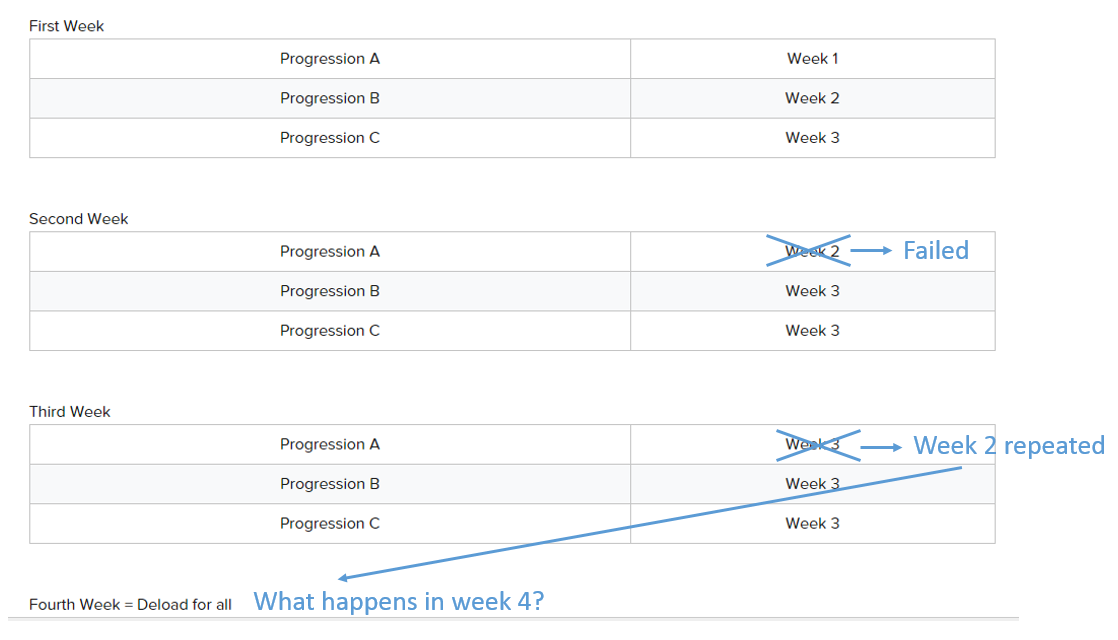
Hi, I never used the scheduler until now and I'm trying to understand how it works (I've been using a spreadsheet so far). I was reading the deload weeks tutorial and I have a question on how the scheduler works when you need to repeat a week because you failed to complete the sets. Hopefully the picture clarifies my question:

post-16859-0-76805300-1452105892_thumb.p


vinca_minor

Always deload everything on the 4th week.

Giovanni Garcea
vinca_minor said:

Always deload everything on the 4th week.

Yes I know that already, but my question is different. How does the workout scheduler handle this?

vinca_minor

Oh sorry, I misunderstood. Wait a week and find out? :)

Cory Fair
Giovanni Garcea said:

Yes I know that already, but my question is different. How does the workout scheduler handle this?


If you are about to deload on one element but not others, it will hold you on that week until the others have caught up and then deload everything together. 


Concrete examples can be found in the deload tutorial:

https://my.gymnasticbodies.com/deload-week-tutorial/

Giovanni Garcea
Cory Fair said:

If you are about to deload on one element but not others, it will hold you on that week until the others have caught up and then deload everything together. 


Concrete examples can be found in the deload tutorial:

https://my.gymnasticbodies.com/deload-week-tutorial/

Just to make sure I understand, does that mean that if one of the elements does not catch up (let's say I need to repeat week 2 again and again) then the deload week is delayed until I finally pass week 2? Maybe the answer is simple but I would love a clarification.